
Homework can be defined as any activity or exercise related to the school curriculum which pupils undertake in addition to their timetabled classroom study. The consolidation of pupils’ current learning will form the large majority of homework that is set by teaching staff.
Homework set at Malet Lambert may include the following:
- Reading – going over a text used in a previous lesson to practice inference skills or answer questions
- Writing – consolidating learning from the current sequence of lessons into an extended response
- Vocabulary – practicing key tier 3 vocabulary and learning spellings
- Research – finding information which will be used in the next lesson
- Answering questions based on work covered in class including exam questions
- Using web-based materials/resources such as Mathswatch
- Applying learning from lessons in a different context
- Past paper revision
The evidence tells us that where homework is used effectively, it can bring substantial benefits to pupil progress. On average, the impact of homework on learning is consistently positive (leading to on average five months’ additional progress at secondary school), therefore, as a school we place a great deal of importance on homework to help pupils develop their retrieval skills, long-term memory and independence.
Homework clubs are available in school for pupils to attend and access support with the work set where needed.
Some homework tasks are set online and require pupils to access their schools accounts, email or Google Classroom from home. Pupils are taught how to do this in their Computing lessons from Year 7, however instructions for accessing home work online are also available below.
Accessing Homework Online
Homework is set in a variety of ways by the different subjects. In some cases, a paper-based homework will be set and in others specific websites are used, such as Hegarty Maths. In other subjects, pupils will be able to access the homework on that particular subject’s Google Classroom.
To access RM Unify from home please visit mls.rmunify.com (or click the link at the bottom of our website) and enter the following credentials:
Username: m.username@mls [note the @mls after the username]
Password: [school password]
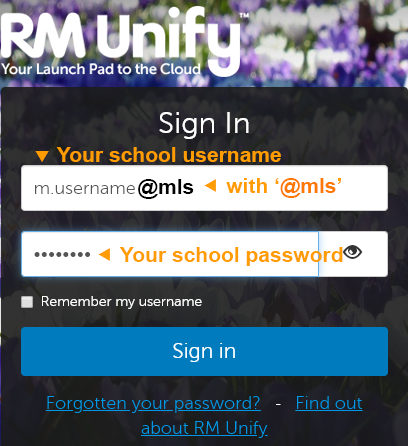
If your child’s password is not working please check the username end in @mls and that they’re using the same login credentials they would be in school. If your child has forgotten their password, they will need to speak to their tutor. If your child is still unable to access RMUnify, please email enquiries@maletlambert.hull.sch.uk from the email address you have registered with the school for assistance.